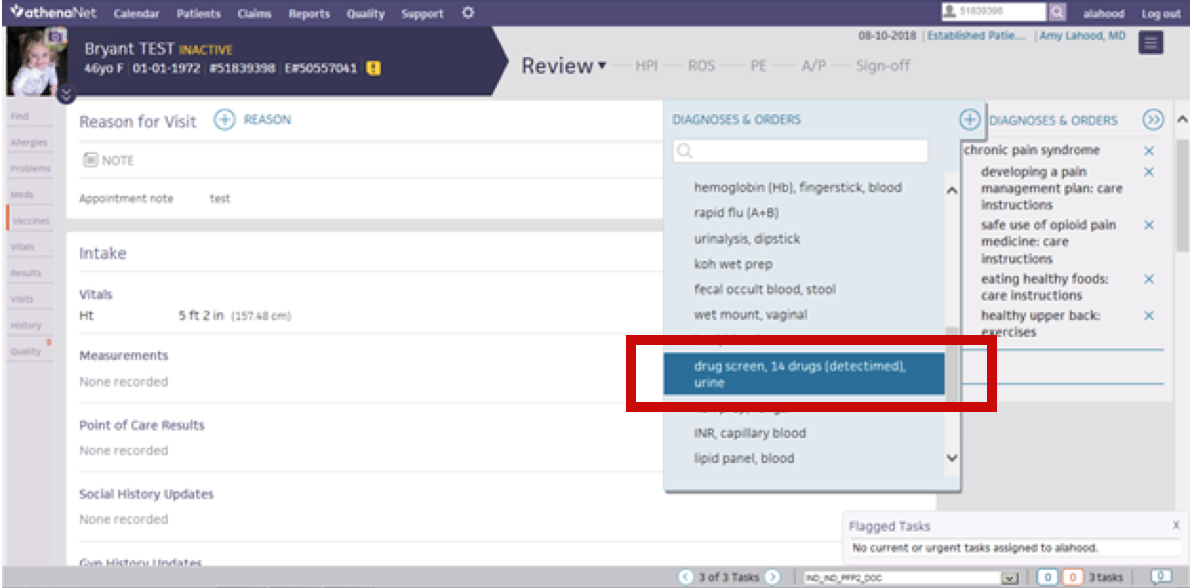
How do I complete a urine drug test that can be recognized by the Opioid Tool?
Complete the ordering of a urine drug test electronically through athenaClinicals® to keep your Opioid Tool accurate.
Point of Care Urine Drug Test
Step 1: In the "Diagnosis & Orders" tab, key in "Drug Screen" in the search bar and select "drug screen, 14 drugs (detectimed), urine" from the drop-down menu
Step 2: After the point of care test is administered and the results are entered, the Opioid Tool will show the completed task, with the time/date stamp documented.
All other Drug Screens
Step 1: In the "diagnosis & orders" tab, key in "pain" and select the appropriate test from the drop-down menu
Step 2: Transcribe the appropriate information and results. The Opioid Tool will show the completed task, with the time/date stamp documented.