
Skip to content
  • There are no suggestions because the search field is empty.

How do I complete a substance abuse risk screen that can be recognized by the Opioid Tool?

Complete and upload an auto-mapped substance abuse risk screens in athenaClinicals® to keep your Shield Opioid Tool accurate.

The ORT© (Opioid Risk Tool) is the default tool for assessing a patient’s risk of substance abuse, however several other tools, including the SOAPP-R© (Screener and Opioid Assessment for Patients with Pain-Revised), CRAFFT© (Car, Relax, Alone, Forget, Friends, Trouble), and DAST© (Drug Abuse Screening Test) are also available as a form through athenaClinicals®.

Step 1: Go to the Patient Chart

Step 2: Go to “Print Forms” from the “hamburger menu” in the upper right
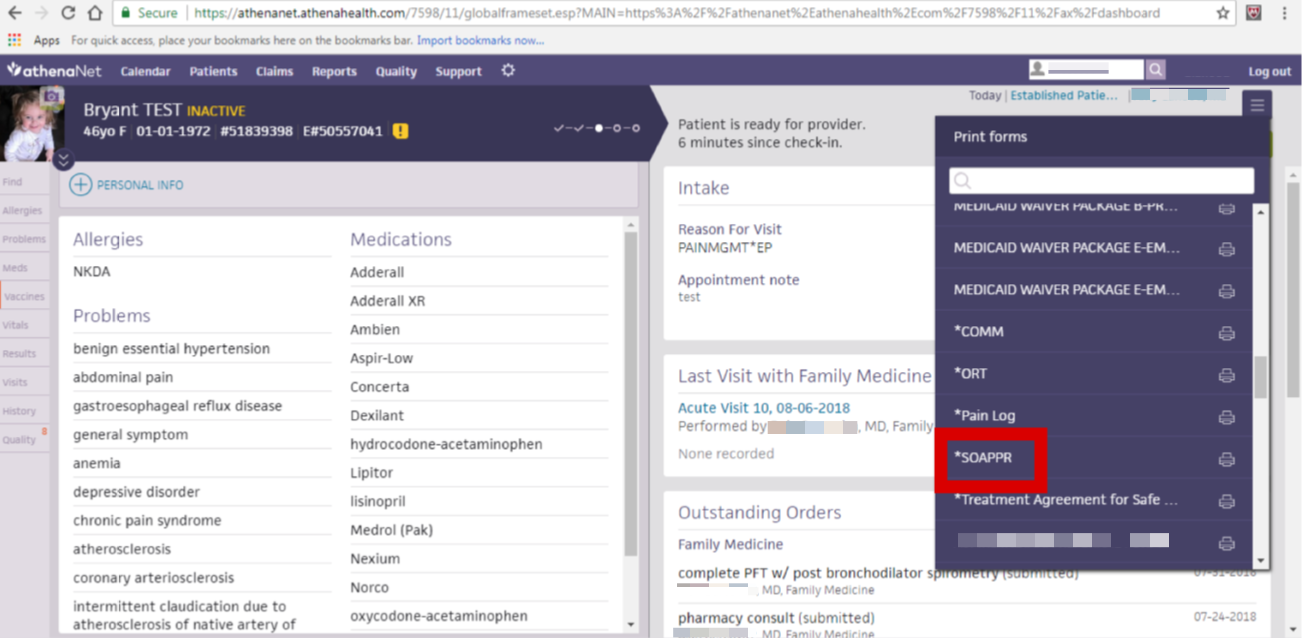
SOAPPR

Step 3: Select the substance abuse risk screen tool of choice (ORT, SOAPP-R, CRAFFT or DAST)

Step 4: Scan and upload document to the Patient Chart

Step 5: Transcribe appropriate information and save

Still need help? Please contact us via Project Prescribe support.