---
title: Huddle - Quick Reference Guide
description: Help Center
---
[Skip to content](https://support.affirmhealth.com/migration/huddle-quick-reference-guide#main-content)
[Contact Us](https://support.affirmhealth.com/kb-tickets/new?hsLang=en)

Open main navigation
Close main navigation
- [Contact Us](https://support.affirmhealth.com/kb-tickets/new)
How can we help you?
- There are no suggestions because the search field is empty.
1. [Help Center](https://support.affirmhealth.com/?hsLang=en)
2. [Huddle](https://support.affirmhealth.com/huddle?hsLang=en)
3. [How To's](https://support.affirmhealth.com/huddle?hsLang=en#how-tos)
# Huddle - Quick Reference Guide
**Huddle**
The huddle is a software application embedded within the EHR consisting of organized quality measures and patient information to increase efficiency of pre-visit planning for clinicians and staff.
Key features include:
- Daily appointment schedule in easy to read format
- Quality measures prioritized by payer, speciality, and due date
- Preventive Care Measures highlighted
- Recent hospitalization and discharge summaries attached
**Access The Daily Huddle Tool**
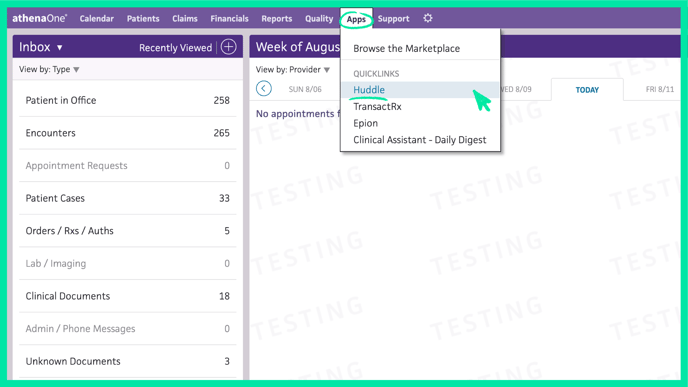
From any page within athenaClinicals, select the ‘Apps’ tab along the top toolbar. Within the dropdown, choose Huddle.
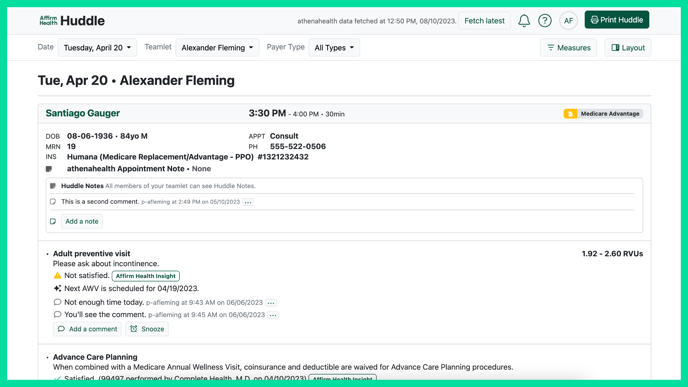
As a physician, your daily schedule of appointments will automatically load. All patient information can be found in the top demographic box, organized by appointment time. Below that, Medicare preventive services, priority quality measures, and recent hospitalization documents can be found.
**Print the Huddle**
To print the schedule for today, select ‘Print Huddle’ on the top right hand of the screen.

**Utilize Filters To Customize Your View**
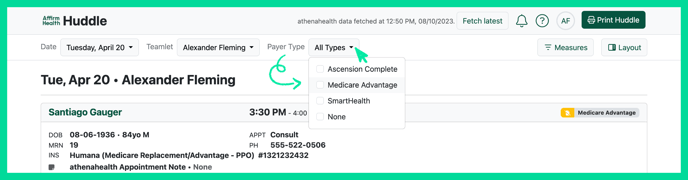
All Quality Measures are pulled into the Huddle directly from athenaClinicals but prioritized for clarity. The default view shows quality measures filtered by:
1. **Priority**, *priorities determined by your organization's leadership and provider specialty*
2. **Past Due**, *Quality measures with a past due status*
**
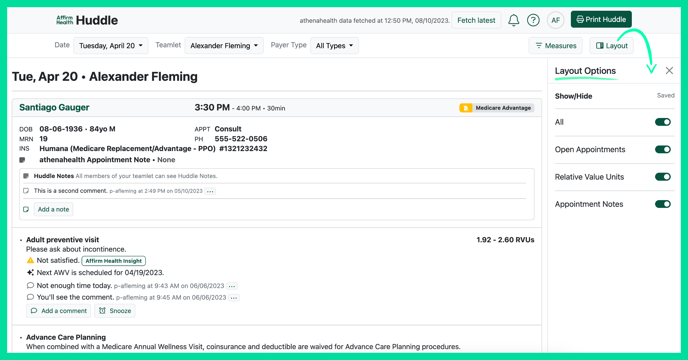
Additional filters can be changed and saved based on user preferences. Each expanded filter will include the following information:
1. **Open Appointments**, *both filled and open*
2. **Medicare Planning Priorities,** *show or hide*
3. **Recent Hospitalization***, show or hide hyperlinked documents*
4. **athena Appointment Notes***, show or hide*
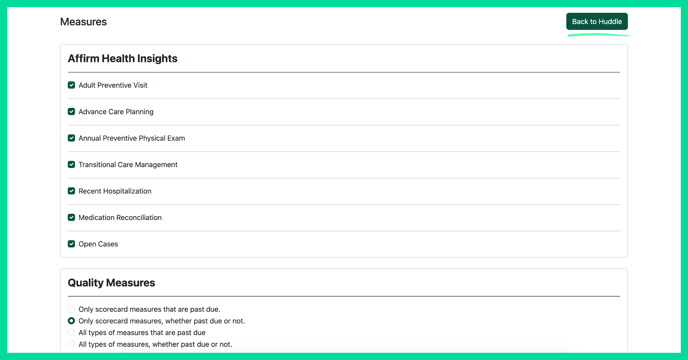
5. **Additional Quality Measures**, *view all quality measures visible in the athena quality tab*
**
- [General](https://support.affirmhealth.com/general?hsLang=en#main-content)
- [FAQ's](https://support.affirmhealth.com/general?hsLang=en#faqs)
- [Privacy Policy](https://support.affirmhealth.com/privacy-policy?hsLang=en)
- [Library of Terms & Features](https://support.affirmhealth.com/library-of-terms-features?hsLang=en)
- [Advance Care Planning Tool](https://support.affirmhealth.com/advance-care-planning-tool?hsLang=en#main-content)
- [FAQ's](https://support.affirmhealth.com/advance-care-planning-tool?hsLang=en#faqs)
- [How To's](https://support.affirmhealth.com/advance-care-planning-tool?hsLang=en#how-tos)
- [Hub](https://support.affirmhealth.com/hub?hsLang=en#main-content)
- [How To](https://support.affirmhealth.com/hub?hsLang=en#how-to)
- [Huddle](https://support.affirmhealth.com/huddle?hsLang=en#main-content)
- [How To's](https://support.affirmhealth.com/huddle?hsLang=en#how-tos)
- [FAQ's](https://support.affirmhealth.com/huddle?hsLang=en#faqs)
[](http://www.affirmhealth.com)